

Hi, in this vlog, I will share how to Create Realistic Images Using GenPrompts App. Learn how to use the GenPrompt AI prompts app with Google Gemini to generate stunning, realistic images. A complete beginner-friendly step-by-step guide.
Create Realistic Images Using GenPrompts |
Introduction
AI image generation is now easier than ever with tools like GenPrompt and Gemini AI. Whether you’re a digital artist, designer, or just curious about visual creativity, you can turn words into art with just a few clicks. In this tutorial, you’ll learn how to copy AI prompts from the GenPrompt app and generate realistic, cinematic, or aesthetic photos using Google Gemini on both the app and the web.
Step-by-Step Guide: How to Use GenPrompt with Gemini AI
Ai Photo Editing Tutorial ⬇⬇
Step 1: Install & Open GenPrompt App
Download the GenPrompt – AI Image Prompt app from the Play Store. Browse the available prompts — categorized for Cinematic, Trending, Couple, and many more styles.

Step 2: Choose a Prompt Template and Copy Prompt
Select a prompt that fits your creative vision. For example: Tap on any Prompt template, then click on the Generate Prompt Button. After generating the prompt, click on the Copy Button.
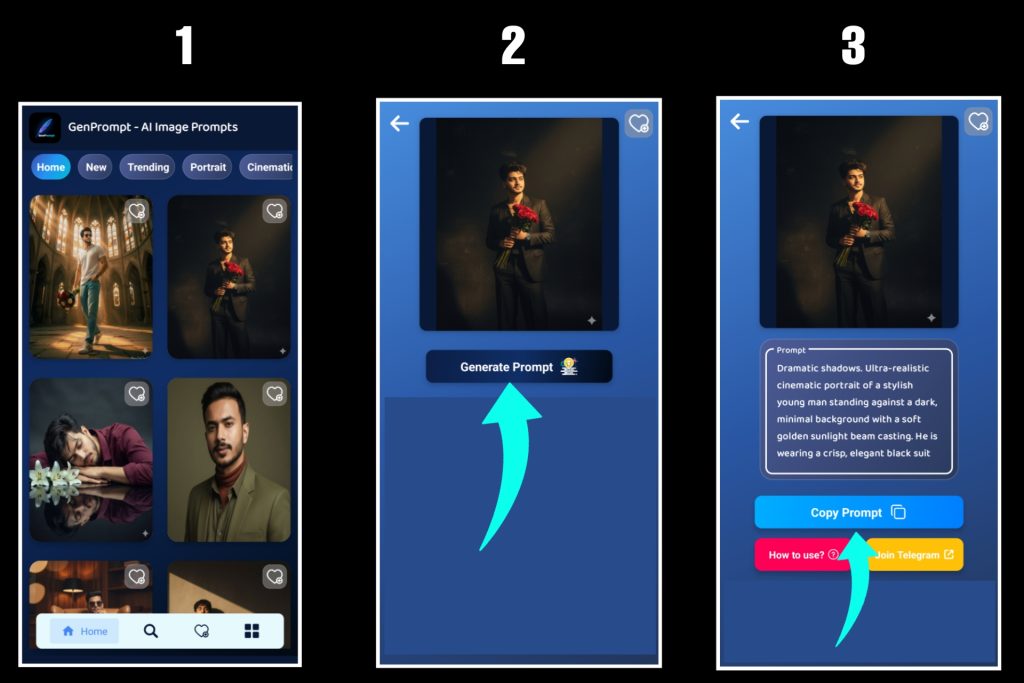
Step 3: Go to Gemini (App or Web)
Open the Google Gemini app on your phone or go to Google Chrome. (You can use either app or web.)
Step 4: Upload a Reference Photo
For portrait prompts, Gemini often performs best when you upload a photo. Upload the image you want the AI to use as a reference.

Step 5: Paste the Prompt, then Submit & Wait for Generation
Paste the copied prompt into Gemini’s prompt box.

Step 6: Finally, Download Your Generated Image
For download, click on the generated Image, then click on the Download Button, and use the image as needed — for content, social media, or creative projects.

Once your AI-generated image is ready, you can download it instantly and use it for your profile picture, social media content, creative projects, or branding needs. The high-quality visuals created with GenPrompt and Gemini are perfect for showcasing your style and making a strong visual impression anywhere online.
Why Use GenPrompt + Gemini?
- Ready-Made Prompts: No need to write from scratch.
- High-Quality Visuals: Combine prompt strength with Gemini’s powerful AI.
- Beginner Friendly: No advanced knowledge needed.
- Creative Freedom: Portraits, surreal edits, cinematic looks — all possible.
See More Post: Ultra-Realistic AI Portrait Using Gemini
🅾 My Instagram. You can follow me on Instagram: ⬇⬇
Conclusion
With GenPrompt + Gemini AI, you don’t need design skills to create breathtaking visuals. Just copy, paste, and generate. It’s that simple. Unlock your creative potential today and explore endless possibilities in AI image generation. Create Realistic Images Using GenPrompts.
GenPrompt provides ready-to-use, highly detailed AI image prompts that are designed to work perfectly with tools like Gemini. These prompts are written in a structured, creative way to guide the AI in generating stunning portraits, surreal edits, and aesthetic styles — all with just a simple copy and paste. Create Realistic Images Using GenPrompts.
On the other hand, Gemini AI offers powerful generation capabilities where your prompts come to life. With a clean interface and support for reference images, Gemini ensures each image reflects the vision described in the prompt. Whether you’re uploading your own photo or experimenting with different prompts, the process remains simple and user-friendly. Create Realistic Images Using GenPrompts.
Together, GenPrompt and Gemini create a seamless experience. You don’t need to be a graphic designer or a prompt engineering expert. Just open GenPrompt, choose a template, copy the prompt, and paste it into Gemini. The AI will handle the rest — giving you incredible results in seconds. Create Realistic Images Using GenPrompts.
This combination is ideal for creating profile pictures, social media content, branding visuals, or simply expressing your creativity through AI art. It saves time, removes the technical barrier, and opens the door to limitless imagination. Create Realistic Images Using GenPrompts.
So, if you’re looking to explore the world of AI visuals, start with GenPrompt and Gemini. Test different prompts, try variations, and build your own AI art collection. The future of creativity is here — and it starts with one prompt at a time.


